Broadcast Audio
The Broadcast Audio recipe can convert AIFF and WAV files into all the common audio standards used online, on TV, and on radio.

a recipe-driven post-production system to
organize assets, run workflows, and deliver final media faster.


A powerful tool that streamlines and automates processes for professional content creation.
Designed for editors, and sound designers, Magnetron.App is an extremely powerful desktop application that wraps up your repetitive tasks with a one-click recipe.
Recipe highlights
A recipe bundles the tools, settings, checks, and export rules for a repeatable media task. These highlights are just a small sample of the full library, from loudness delivery to file conversion and finishing workflows.
The Broadcast Audio recipe can convert AIFF and WAV files into all the common audio standards used online, on TV, and on radio.
Bring your audio up to broadcast standards with a workflow built around the official EBU R128 loudness spec used across TV and radio.

Replace the audio track of a video file in a few clicks, ideal for client previews, updated mixes, and voice-over revisions.

Apps and workflows
Monotron apps package one proven Magnetron workflow into a standalone tool. Magnetron gives you the full recipe library, broader workflow control, and room for custom or expert recipes.
Focused tools for one repeatable job, like loudness correction or broadcast delivery checks.
Browse standalone appsThe complete desktop environment for running recipes, combining workflows, and building repeatable production pipelines.
Browse recipescompare plans
See the differences between the free version, the subscription, and the perpetual license before you decide how you want to work.
Starter
Forever free and no registration required.
The free version includes complimentary recipes and is not extendable with advanced recipe packs.
Flexible
Cancel any time and always up to date.
Sold and fulfilled by
A monthly subscription keeps you on the latest version and can be cancelled whenever you need.
Permanent
Pay once and get one year of free updates.
Sold and fulfilled by
A perpetual license lets you use the software indefinitely and includes one year of free updates. Continued updates renew automatically each year. Prefer a one-time purchase without renewals? Buy it here
For custom orders or educational use, contact us and we will help you find the right setup.
Tech details
Magnetron includes its own local audio engine for loudness workflows, so recipes can inspect, correct, limit, export, and revalidate files without sending you through uploads or a chain of separate tools.
Read real audio metadata and measure integrated LUFS, momentary loudness, loudness range, sample peak, and true peak.
Apply gain, normalize toward delivery targets, resample when needed, choose bit depth, and add TPDF dither for lower-bit PCM exports.
Use fast sample-peak limiting or a secure true-peak limiter to keep corrected files inside strict broadcast and streaming ceilings.
Re-measure processed files, check delivery tolerances, and confirm corrected output before export.
Powered by MagAudioCLI with libsndfile and libsoxr support for inspect, analyze, process, waveform export, resampling, revalidation, and common WAV, AIFF, FLAC, OGG/Opus, CAF, and MP3 audio workflows.
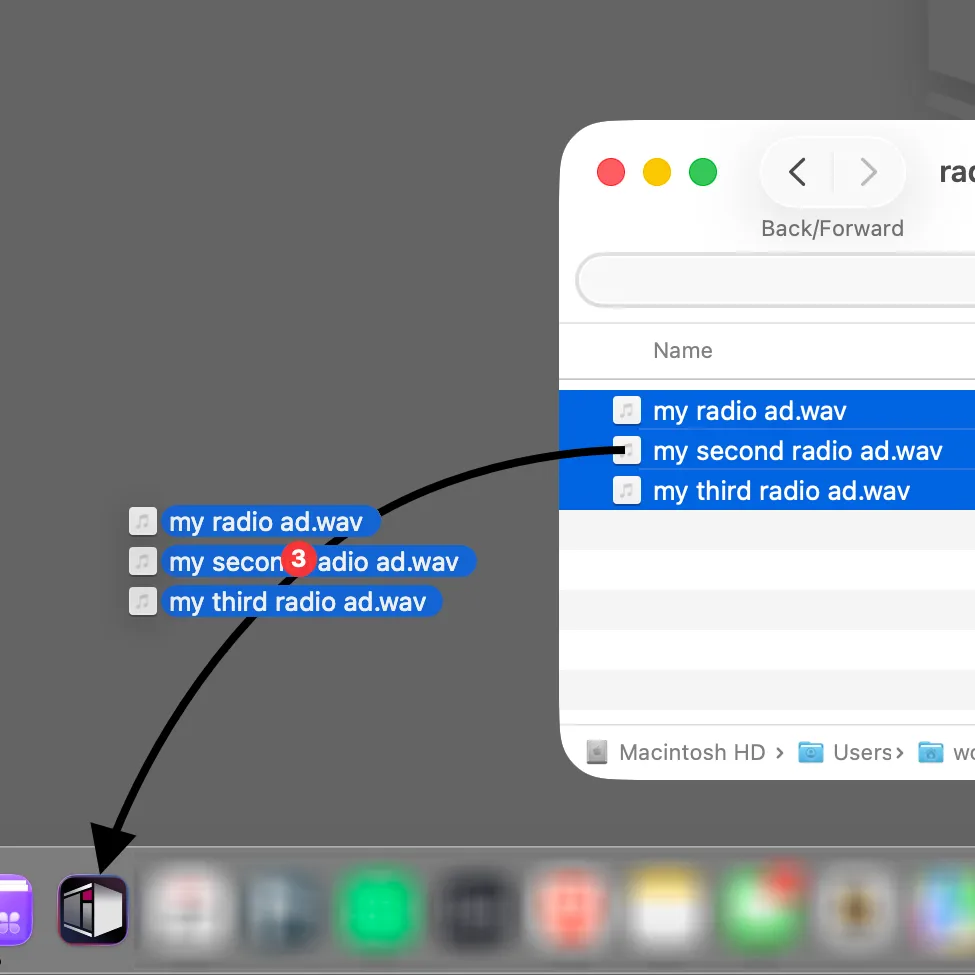
Drop files straight onto the app
to open and add.
Workflow
Magnetron gives you flexible settings for the way you already work, from quick drag-and-drop input to startup recipes and automatic export modes. Read more
Customize and themes
Choose from four built-in looks, favorite the recipes you use most, and hide the ones that do not belong in your daily workflow. Learn more about the launcher

